

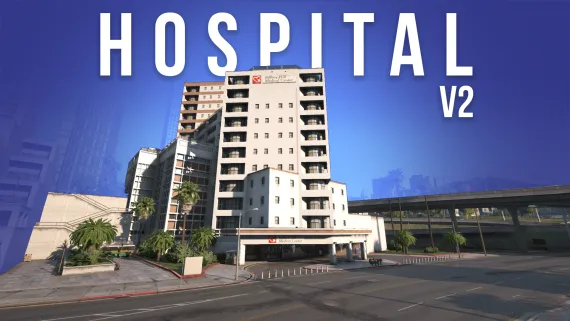
Version 1.0 includes
- Reception
- 1 Cafeteria
- 1 Chief’s Office
- 1 Staff Cafeteria
- 2 Consultation Rooms
- 1 Rehabilitation Room
- 1 Men’s Restroom
- 1 Women’s Restroom with Baby Changing Facility
- 1 Cloakroom
- 1 MRI Room
- 1 MRI Monitoring Room
- 1 Radio Room
- 1 Radio Monitoring Room
- 2 Operating Rooms
- 1 Morgue
- 1 Asylum Room
- 1 Dentist Room
- 1 Bedroom with 1 Bed
- 1 Bedroom with 2 Beds
- 1 Bedroom with 5 Beds
- 1 Meeting Room
- 1 Laboratory
- 1 Archives Room
Update 2.0 includes
- Reception
- 2 Consultation Rooms
- 1 Office
- 1 Garage
- 1 Radio Room
- 1 Intensive Care Room
- 1 Surgery Room
- 1 Operation Room
- 1 Laboratory
- 1 Vision Surgery Room
- 1 Helipad
- 1 Camera Room
- 1 Back Corridor
- 1 Secret Tunnel
More information
- Ambient sounds
- Custom door sounds
- Optimized
- LODs included
- MRI and Radio presets
Please note that this is Version 2.0.0 of the hospital. If you encounter any bugs or issues, please open a ticket on Discord and we will do our best to resolve them quickly.
Photos:
Images
Script included
A script is provided with the MLO, allowing you to:
- Operate the MRI machine
- Operate the radio equipment
- Control equipment from the control room
- Push beds
- Hold IV drips
- Wash your hands
- Take a shower
The script is fully customizable, so you can enable or disable features depending on your needs.
Please note that the script is designed to work only with:
- ox_target
- qtarget
- qb-target
- Custom target systems
It is important to note that this script is only compatible with our MLO.
Performance
We are pleased to announce that the Pillbox Hospital MLO has been optimized for strong FPS performance. With an RTX 3070, playing on Ultra settings with NVE, you can expect FPS ranging from 100 to 180.
Enjoy a smooth and immersive experience with a hospital designed for both visual quality and performance.
Compatibility
We understand that some users may experience compatibility issues such as floating objects, abnormal collisions, or similar problems.
These issues are generally not caused by our product itself, but by external conflicts with other resources. That is why we strongly recommend using the compatibility tool below to quickly identify the source of the problem.
Prompt Compatibility Tool:
https://prompt.tebex.io/compatibility-tool
This tool was specially created by PROMPT MLO to help diagnose and resolve compatibility issues. By using it, you can more easily identify conflicting resources and fix the problem.
Many thanks to him for this tool.
How to push beds and IV drips
To push beds and IV drips, please note that the beds already placed in the mapping cannot be moved, as they are props integrated directly into the .ytyp.
To make movable beds and IV drips available, you need to add a few lines of code to your ambulance job resource.
Client events :
AddEventHandler('diables_hospital:props_lit', function()
    local prop = "v_diables_hopital_bed01"
    local x, y, z = table.unpack(GetOffsetFromEntityInWorldCoords(PlayerPedId(), 0.0, 2.0, 0.55))
    local obj = CreateObjectNoOffset(prop, x, y, z, true, false)
    PlaceObjectOnGroundProperly(obj)
    FreezeEntityPosition(obj, true)
end)

AddEventHandler('diables_hospital:props_perf', function()
    local prop = "v_diables_hopital_perf_01"
    local x, y, z = table.unpack(GetOffsetFromEntityInWorldCoords(PlayerPedId(), 0.0, 2.0, 0.55))
    local obj = CreateObjectNoOffset(prop, x, y, z, true, false)
    PlaceObjectOnGroundProperly(obj)
    FreezeEntityPosition(obj, true)
end)

AddEventHandler('diables_hospital:props_perf2', function()
    local prop = "v_diables_hopital_perf_02"
    local x, y, z = table.unpack(GetOffsetFromEntityInWorldCoords(PlayerPedId(), 0.0, 2.0, 0.55))
    local obj = CreateObjectNoOffset(prop, x, y, z, true, false)
    PlaceObjectOnGroundProperly(obj)
    FreezeEntityPosition(obj, true)
end)
ox_lib menu example :
local Options = {
    {
        title = "BED",
        description = '',
        icon = '',
        arrow = false,
        event = 'diables_hospital:props_lit',
    },
    {
        title = "PERF 1",
        description = '',
        icon = '',
        arrow = false,
        event = 'diables_hospital:props_perf',
    },
    {
        title = "PERF 2",
        description = '',
        icon = '',
        arrow = false,
        event = 'diables_hospital:props_perf2',
    },
}
Important information
After purchasing the MLO, no refunds will be accepted. Please make sure to review your needs carefully before completing your purchase and confirm that this is the right product for your server.
Once the resources have been transferred, refunds or revocations will no longer be possible.